Monday, November 12, 2007
Monday, May 14, 2007
The Infinite Thinking Machine
Great title... great blog, videos, handouts, information, and resources! What is the Infinite Thinking Machine?
The Infinite Thinking Machine (ITM) is designed to help teachers and students thrive in the 21st century. Through an active blog, an Internet TV show, and other media resources, the ITM shares a "bazillion practical ideas" for turning the infinite universe of information into knowledge. We showcase examples of innovative instructional methods, talk with leading experts, and share real stories from the classroom to improve how we think, learn, teach, and live. And we try to have a little fun along the way.
If you are looking for new and cutting-edge ideas for your classroom, this is the place to visit.
Posted by
Shawn Brandt
at
10:34 PM
0
comments
Tags: Lesson Plans, Staff Development, Web 2.0
Intel Goes Web 2.0
The hot topic in education technology this school year has definitely been Web 2.0 ; a term used to describe how the Internet has shifted from a "consumable" resource to an interactive environment where global citizens "contribute" to a wealth of information. Examples of Web 2.0 include wikis, blogs, online collaborative editing sites, tagging/bookmarking, podcasting, Really Simple Syndication (RSS), and online video. The popularity and innovative uses of these Internet applications continue to grow exponentially.
Another indication that Web 2.0 is impacting education is the recent announcement by Intel®... They have redesigned their Essentials Course (formerly Teach to the Future) to align with the most current pedagogical approaches and promote 21st century skills such as wikis, blogs, online collaborative editing sites, and tagging/bookmarking (sound familiar?). The curriculum still includes the integration of Microsoft Office products, but now provides information for alternatives such as Open Office.
The changes emphasize the fact that we need to teach and learn with 21st century tools. I welcome the decision to update the curriculum and look forward to facilitating another cohort of New Prague teachers!
Posted by
Shawn Brandt
at
10:33 PM
0
comments
Tags: Best Practices, Staff Development, Web 2.0
Sunday, April 01, 2007
Web 2.0 - Part VI: Podcasting
This is the eighth issue of the Teaching with Technology newsletter and yes, I have more to share about web 2.0... podcasting. As mentioned in the previous newsletters, web 2.0 is about the Internet shifting from content that is "read only" to a format that allows users to contribute to the medium. Podcasting is like blogging with audio files. Users create "radio-style" shows that are "broadcast" on the Internet. People podcast about a variety of topics including hobbies, careers, interests, and areas of expertise. For educators, this means people are podcasting about history, poems, science, technology, fitness, world languages... the list is endless... and free! Teachers are using podcasts to learn and share best practices; their students are creating podcasts to demonstrate knowledge of the learning objectives.
Many people are confused by the term, podcast. The list below gives answers to some of the frequently asked questions:
Do I need an iPod to listen to a podcast?
No, you can listen to podcasts directly on your computer, any mp3 player, OR an iPod.
Where do I find podcasts?
I think the easiest way to start is iTunes. With this free program you can search, stream, download, and subscribe to podcasts. There are a number of large podcast directories such as Yahoo! Podcasts, Podcast.com, and Odeo. Education specific directories include EPN (Education Podcast Network), OpenCulture, UC Berkley, NPR Podcasts, and Apple Learning Exchange.
What does it mean to subscribe to a podcast and how do I do it?
Some podcasts are posted weekly or even daily, but most podcasters create episodes when they have time. Services like iTunes allow listeners to easily subscribe to their favorite programs in one location. When new episodes are posted, iTunes automatically imports the selected programs.
How do I create a podcast?
Creating a podcast is easier than you might think. Typically, all you need is a computer, recording software, a microphone, and a hosting service. You can even create a podcast using any telephone. The most popular recording software is Audacity (free download), an entry-level microphone can be purchased for about $10, and hosting services can be found for free. After testing several, my favorite is Gcast.
I've posted my first podcast in the upper-right sidebar. Click the "Gcast" play button and let me know what you think.
Posted by
Shawn Brandt
at
3:56 PM
1 comments
Tags: Cool Tech Tools, Staff Development, Web 2.0
Intel® Summer Workshops
Last school year, New Prague Area Schools was able to participate in the Intel® Teach to the Future program, thanks, in part, to the federal Enhancing Education Through Technology (EETT) grant. The grant was awarded through a collaborative effort between the Carver-Scott Educational Cooperative and 11 neighboring school districts. With federal educational funds being reduced, New Prague is fortunate to receive a second round of funding this school year. In this phase, the Intel® Teach Thinking with Technology program will give teachers with intermediate-level technology integration skills (Intel® Teach to the Future or equivalent competency) an opportunity to enhance these skills and promote higher-order thinking.
The EETT grant has provided New Prague Area Schools funding to implement an established professional development program that can be tailored to meet the specific needs of our district. If you are looking for summer professional development opportunities, consider one of the following options:
Option #1: Intel® Teach to the Future
- June 18 – August 10
- 3 face-to-face meetings
- Online instruction and activities
- Create a technology enhanced unit for your curriculum
- Portland State University graduate credits (5-quarter / 3-semester)
- $250 registration fee (optional)
- Stipend opportunities available
- NOTE: 20 NP teachers completed the course last summer; 10 more will be finished in May.
Option #2: Intel® Teach Thinking with Technology
- August 6 - 9
- 4 classes (6 hours each)
- Create a unit using online visual learning tools (concept mapping, visual ranking, etc.)
- Portland State University graduate credits (5-quarter / 3-semester)
- $250 registration fee (optional)
- Stipends provided through EETT grant
- NOTE: Be part of the first NP cohort to complete this intermediate-level course.
For more information, attend one of the question and answer meetings:
- Middle School: Media Center, April 10, 7:15 - 7:25 am
- High School: Faculty Meeting, April 11, 7:05 am
Posted by
Shawn Brandt
at
3:55 PM
0
comments
Tags: Best Practices, Staff Development
South of the River Learning Academy (SORLA)
In addition to the technology integration courses offered this summer, New Prague Area Schools also participates in the South of the River Learning Academy (SORLA).
What: Top-Quality Professional Development for Pre-K-12 Educators
When: June 18-21
Where: Century Middle School in Lakeville
Interest: Math, Reading, Mental Health, Technology, Writing and more...
Cost: $35 per session, graduate credit optional available
- Great Lunches
- CEUs for license renewal
- Graduate Credit for lane change
- Presenters from all over MN and a few from New Prague...Shawn Brandt, Kelly Behrendt, Barb and Stefan Kavan, MaryKay Proshek, and Pat Beckius
Check lounges and mailbox areas around your buildings for brochures or go right on the SORLA website.
Questions? Call... Colleen Cardenuto at ext. 1740
Posted by
Shawn Brandt
at
3:55 PM
0
comments
Tags: Best Practices, Staff Development
Friday, March 02, 2007
i.e. (Interactive Educator)
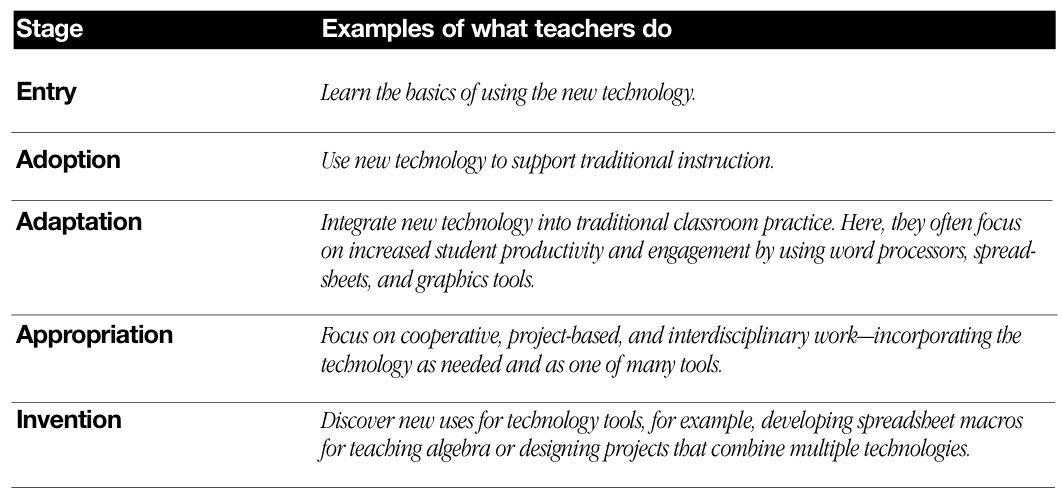
We have a number of teachers in our district who are starting to enhance lessons with interactive whiteboards. The technology is easy to use, but designing lessons that use the technology efficiently and effectively can be challenging. Research shows that teachers often start by applying new technology with traditional teaching practices (refer to ACOT: Stages of Technology). Using this technology with traditional teaching methods will capture students' attention, but improved achievement happens with students "interact" with the lesson.
Resources:
- i.e. Interactive Educator, Free quarterly magazine
- Apple Classrooms of Tomorrow, 13-year research project
- ACOT: Stages of Integration image, Provided by Wesley Fryer
Posted by
Shawn Brandt
at
7:25 PM
0
comments
Tags: IWB, Lesson Plans, Staff Development
Monday, February 05, 2007
Staff Development Day 2007
1 day... 25 presenters... 250 participants. Learning new ways to integrate technology... priceless. Thanks again to everyone who helped make the Staff Development Day a success. Kudos to Julie Schmitz for taking pictures and producing this video!
Posted by
Shawn Brandt
at
7:04 AM
0
comments
Tags: Staff Development
Tuesday, January 02, 2007
Staff Development Day: Integrating Technology
Since 1999, over 3 million teachers (including 20 from New Prague) in 35 countries have completed the Intel® Teach to the Future professional development program. Teachers learn from other teachers how to integrate technology into their current curriculum. The course focuses on using technology to develop students’ higher-order thinking skills. Throughout the course, teachers develop a unit portfolio that includes lesson plans, student project samples, and assessment tools.
With help from the NCLB Enhancing Education Through Technology grant, New Prague, along with 10 other local school districts, was able to start implementing the program. On January 22, our Staff Development Day will focus on integrating technology. The Intel® participants will present a variety of teaching strategies to help educators at all levels incorporate technology into their lessons.
Most teachers would agree the best professional development workshops are ones that share information, best-practices, and resources that can be applied immediately in the classroom. With that in mind, the goal of each workshop is to provide a “mini-session” of the Intel experience. Presenters will share examples of supporting instruction with technology and demonstrate specific skills to help teachers get started. Next, teachers will be given “hands-on” time to apply the technology to a specific lesson and ask questions with support from classroom teachers who have experience with the technology. To make the best use of our limited time, teachers are asked to bring the following items to the workshops.
- Materials for a lesson that will be taught between February – May
- Username/Password information for resources that might be used, e.g., School login, Skyward, TeacherWeb, United Streaming, etc.
- Flash drive for saving files
Workshops have class size limits; register early to ensure your schedule. Online registration begins Thursday, January 4 – Thursday, January 11. http://www.np.k12.mn.us/OnlineRegistration/
Posted by
Shawn Brandt
at
7:05 AM
0
comments
Tags: Staff Development
Earn Graduate Credits with Intel – Teach to the Future
One of the workshops offered at the Staff Development Day on January 22 can be taken for graduate credit. The Intel – Teach to the Future course description reads...
This will be the first meeting of the 40-hour course. Participants can earn 5-quarter credits from Portland State University for a $250 tuition fee and apply it towards lane advancement. This year’s technology integration Staff Development Day is made possible because 20 elementary, middle, and high school teachers committed and participated in the Intel Teach to the Future course last summer. Teachers learned how, when, and where to incorporate technology tools and resources into their curriculum. If giving up 40-hours of your summer does not sound like vacation, maybe you want to consider taking the course during the school year. You will be introduced to the Intel course and have an opportunity to decide if you would like to continue with the graduate level class. Coursework will be completed by May 18.
You can view the course syllabus online or, for more information, contact Shawn Brandt at ext. 1349.
Posted by
Shawn Brandt
at
7:04 AM
0
comments
Tags: Staff Development
Pick-Up and Drop-Off Folders Are Here!
At the beginning of the school year, I gave a staff presentation that described technology changes in our district, e.g., new computers, flash drives, AB Tutor Control, pick-up/drop-off folders… many of you have been asking about that last one. The tech support staff found several problems when trying to create folders with multiple levels of permissions for a variety of users. Because teachers continued to stress the importance of this capability, the tech’s continued to research solutions. This was a great example of the tech support staff and teachers working together to make technology work effectively and efficiently in the classroom. I am happy to report that it has passed the testing phase and the folders will be ready to use beginning in January. What’s so special about these folders? Each teacher will have their own folder (separate from their secure X:drive folder). Within the teacher’s folder is a Pick-Up and Drop-Off folder…
Pick-Up Folder (students use folder to “pick-up” assignments)
- Teacher can save copies of files (e.g., Word, PowerPoint, pictures, video, etc.)
- Teacher can organize files into unit, chapter, or topic folders
- Students can view files and save changes to their X:drive folder
- Students cannot delete or rename files
- Students cannot add files or folders
Drop-Off Folder (students use folder to “drop-off” assignments)
- Teachers can create unit, chapter, or topic folders for students to submit their assignments
- Teachers can view, copy, or delete any files
- Students can paste assignments from their X:drive, flash drive, or desktop
- Students can open folders
- Students can “see” if the assignment has been pasted
- Students cannot view files
- Students cannot delete or rename files
- Students cannot copy files
A help session will be presented in early January to demonstrate tips and suggestions for using the pick-up/drop-off folders. Thank you for input.
Posted by
Shawn Brandt
at
7:03 AM
0
comments
Tags: Staff Development
Monday, December 04, 2006
December: The 3rd Issue!
It's hard to belive, but this is already the 3rd issue of the "Teaching with Technology" newsletter. Many of you have told me that you enjoy reading the newsletter; thank you for the positive feedback. I'm happy teachers are finding this new form of communication helpful. Here are the topics for this issue:
- Let MarcoPolo Do the Exploring
- Web 2.0 – Part II: Blogging
- Mimio Interactive Whiteboard
- Cool Tech Tool: NewsMap
Posted by
Shawn Brandt
at
7:05 AM
0
comments
Tags: Staff Development
Mimio Interactive Whiteboard
You might be more familiar with the term SMARTboard… it is the “Kleenex” of interactive whiteboards. There are several technology products on the market now that fall into the category of interactive whiteboards. These tools all have a few things in common… they use a LCD projector to project a computer screen onto the whiteboard; they have a “stylus” that allows the user to control the projected image like a mouse; and can be used as a writing surface to make notes on the projected image. Most importantly, students can interact with the content on a whole new level.
How is a Mimio different than just using a projector and writing notes with a dry-erase marker? Let’s use PowerPoint as an example. You have your slides created and information organized. You’ve included bulleted notes, images, a webpage, and even a short video clip; but instead of standing at the computer to present the information, you can present where the information is being displayed. A student has a question? You can reinforce the concept with notes directly on the slide (or image, website, video, etc.). If you are teaching this lesson again, those notes can be saved and displayed again for the next class. A few simple review questions could be displayed at the end of the presentation. Have students interact with the Mimio by answering the questions and moving objects (such as a rectangle) to reveal the correct answer.
Being the lesson is presented electronically; it can be saved in a variety of formats. Print the notes for study guides or to meet IEP requirements. If a lot of students are absent for the lesson, it can be posted to your TeacherWeb site to be viewed or printed online. The saved lesson can be retrieved next trimester or next year and easily modified.
The middle school and high school currently have a number of Mimios in use with a few available on a checkout basis. If you are interested in learning more, please join Steve Mefford, a Mimio sales representative, for a product demonstration on Wednesday, December 6 at 7:00 am at the Middle School (Kim Borwege’s computer lab).
Posted by
Shawn Brandt
at
7:02 AM
0
comments
Tags: Cool Tech Tools, IWB, Staff Development
Monday, October 02, 2006
The New Technology Integration Newsletter
Thank you for taking time to check out the new "Teaching with Technology" newsletter. The purpose of this monthly newsletter is to help teachers stay informed of technology integration topics in the New Prague Area Schools. Each issue will contain articles related to district technology resources, best practices, lesson plan ideas, and the "Cool Tech Tool" of the month. If you have a success story, lesson plan idea, or a teaching tool that you would like to share, please contact me at sbrandt@np.k12.mn.us. I appreciate your input and any feedback you have to offer.
Posted by
Shawn Brandt
at
7:05 AM
0
comments
Tags: Staff Development